Is SafeAssign free? Tips on How to Use SafeAssign Checker for free
SafeAssign is essential for students and educators to ensure academic integrity by detecting plagiarism in written assignments.
Alternative plagiarism detectors, nevertheless, are accessible online and have choices for free usage.
This post will discuss how to use SafeAssign-like plagiarism checkers for free while preserving your academic work’s integrity.
Is SafeAssign checker Free?
Through the learning management system of their university, students typically have access to SafeAssign. Although it might be free for students to use while enrolled in classes, it is not free for the general public or on its own outside educational platforms.
Also, it is a paid service provided by universities and educational institutions with a subscription or license for SafeAssign. Students can use SafeAssign for free through their institution’s learning management system as part of their academic resources.
How to use SafeAssign for free
1. Be a student
You must be a student enrolled in an educational institution with access to the SafeAssign tool to use it for free.
Typically, learning management systems like Blackboard are connected with SafeAssign. Once you have access, you can use the SafeAssign interface to submit your assignments.
It will then check your work against a sizable database of academic papers, online sources, and assignments from other students. A thorough analysis produced by SafeAssign highlights any possible instances of plagiarism or incorrect citation.
The fact that SafeAssign is not accessible outside of specific educational platforms should be noted. However, there are free alternatives available online that provide comparable functionality.
2. Use a Friend’s Account
It may be convenient if you and your friend use their SafeAssign account.
Remember, it is crucial to remember that this technique violates SafeAssign’s intended function and may result in academic misconduct. Following moral standards and using SafeAssign sensibly within your account is best.
3. Upload the Draft Document
SafeAssign is a plagiarism detection tool typically integrated with learning management systems like Blackboard, and it is not available for free outside of these platforms. However, there are actions you may take to get the most out of SafeAssign.
First, ensure you are registered at a school offering SafeAssign access. Log in after creating a trustworthy account, then go to the SafeAssign area.
When you upload, SafeAssign will compare your assignment or document against its vast database. Any possible instances of plagiarism or inappropriate citation will be highlighted in the findings.
4. Ask the Professor to Check it For You
Most of the professors have access to the SafeAssign account. If you are in a working relationship with a specific professor, you can ask them to check it for you and later give you the results.
The professor will let you know if the score is within acceptable levels. Also, if the score is outside the suitable range, you must make some adjustments as advised.
5. Use the School’s SafeAssign Account
You can use the SafeAssign account owned by your institution to use SafeAssign for no cost. To do this, you must attend a school with SafeAssign incorporated into its learning management system.
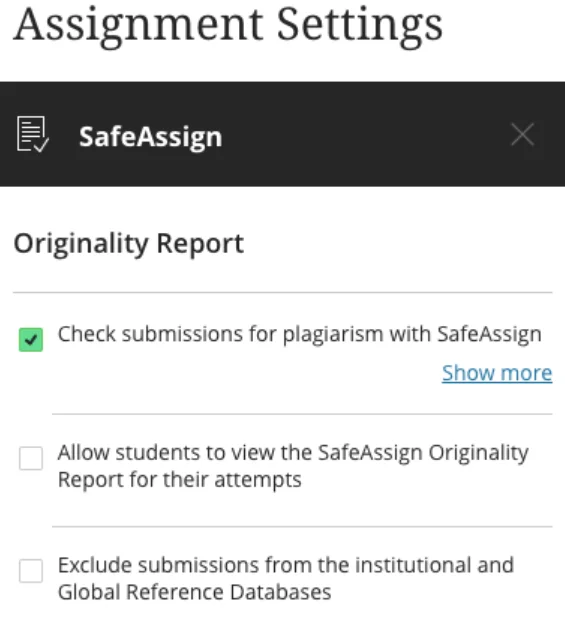
Access the SafeAssign area of your school’s learning management system by logging in, such as Blackboard. To upload a document or assignment for plagiarism checking, follow the steps.
When SafeAssign compares your work to its database, it will produce a thorough report pointing out any possible plagiarism or inappropriate citations.
To protect academic integrity, follow your institution’s SafeAssign policies and procedures.
Can I use SafeAssign to Download for Free?
Educational institutions with a license or subscription to the program often provide access to SafeAssign. If their university has a learning management system, students can utilize it to access SafeAssign.
No, SafeAssign is not a standalone program that can be downloaded for free. It is a tool for detecting plagiarism built into particular learning management systems, like Blackboard.
However, it is only feasible or permitted to use SafeAssign separately as software or to download it on your own with the appropriate authority or a legitimate institutional account. It’s critical to adhere to SafeAssign’s license terms and conditions.
How to use SafeAssign Checks for your Draft Files
Here are the steps to follow:
- Access SafeAssign through your learning management system: Log in to your educational institution’s learning management system, such as Blackboard, where SafeAssign is typically integrated.
- Locate the SafeAssign feature: Navigate to the section or tab within the learning management system where SafeAssign is available. It may be labelled as “SafeAssign,” “Plagiarism Checker,” or something similar.
- Upload your draft file: Look for the option to upload or submit your file for checking. Click the appropriate button or link and select the draft file you want to check from your computer.
- Confirm submission details: Review the submission details to ensure you have selected the correct file and any additional options provided, such as whether to include the document in the SafeAssign global reference database.
- Initiate the check: Once satisfied with the submission details, click the “Submit” or “Check” button to initiate the plagiarism check. SafeAssign will analyze your draft file against its extensive database of academic sources and previously submitted papers.
- Review the results: After the check is complete, SafeAssign will generate a report highlighting any potential instances of plagiarism or improper citation.
Access and review the report within the learning management system to understand the flagged areas and make necessary revisions to your draft.
- Revise and resubmit if needed: If the report identifies potential issues, carefully review the flagged sections and make appropriate revisions to ensure proper citation or paraphrasing.
If necessary, repeat the submission process with the revised version to confirm the changes.
Is SafeAssign Suitable for Students?
Students may confirm the authenticity of their assignments, learn about suitable citation techniques, and prevent accidental plagiarism by using SafeAssign.
Yes, students benefit from SafeAssign. Through the identification of instances of plagiarism in their work, it promotes academic integrity. It encourages a culture of honesty and ethical writing by allowing students to review and improve their work before turning it in.
Overall, SafeAssign is useful for promoting students’ academic integrity and advancement.